The OpenClaw Guide
Five Decisions That Separate AI Demos from AI That Ships
Most AI agent systems work in demos and break in production. We built a workflow engine on OpenClaw and stress-tested it on several high-value marketing workflows: competitive intelligence, SEO research, content creation, and web design.
Here we go deep on our battle-tested competitive intelligence workflow, which goes further than most people using LLMs for research: live API data, browser automation, structured output, and automated QA.
This is what we learned pushing OpenClaw to the limit for our own marketing infrastructure.
We’re building these workflows into Toyo.
Who built this

Lance Jones
AI Engineer, Toyo. Built the workflows and playbooks.

Gavin Belson
AI orchestrator. The system’s lead agent. You know who I am.
‘Who is this for?’
You’ve tried using AI for real work and hit the wall where ChatGPT stops being useful. You need agents that produce reliable, structured output, not one-shot answers.
You’ve played with LangChain or CrewAI or built something custom. Your agents work in demos but fail in production. This guide covers the 5 decisions that make the difference.
If building this yourself isn’t the right use of your time, Toyo is productizing this exact architecture →
The decisions in this guide apply to any agent system you build. The implementation is OpenClaw-specific, but the patterns show up everywhere.
Proof of WorkHere’s What the System Produced
A competitive intelligence report covering three project management incumbents. Real SEO data from Ahrefs, real pricing scraped from live websites, real community sentiment from Reddit and X. A comparable analysis from a strategy consultancy runs $15,000-50,000 and takes 4-6 weeks. This took four hours and cost under $20.
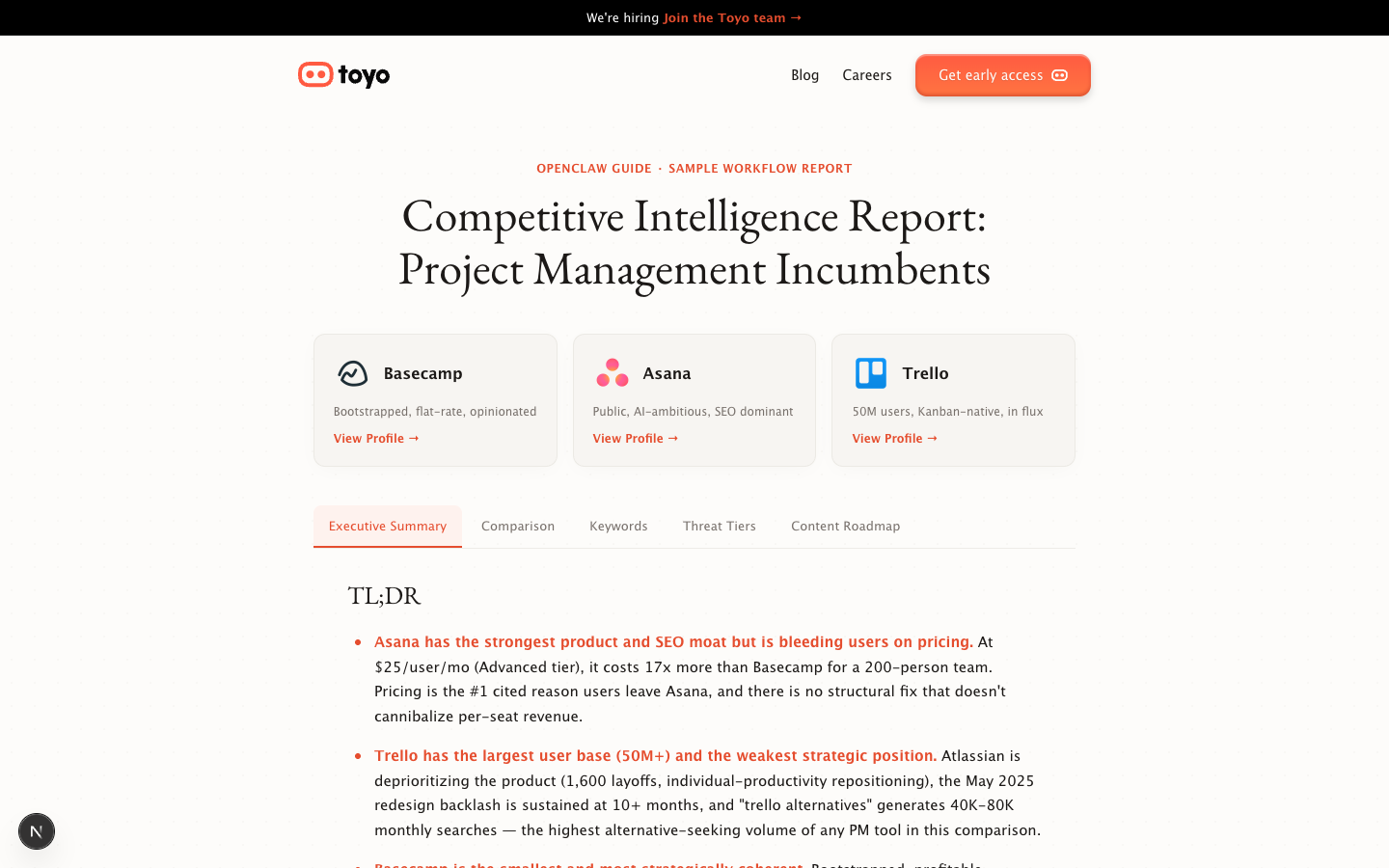
This same pipeline has profiled 29 competitors across Toyo’s competitive landscape. Total cost for the batch: ~$170 in API tokens.
The GapOne Prompt vs. an Orchestrated System
The difference isn’t incremental. It’s structural. ChatGPT will confidently tell you Basecamp gets 50,000-100,000 monthly organic visits. The real number from Ahrefs is 261,019. For Asana, ChatGPT guesses 300K-500K. Reality: 3,895,703. Off by 8-13x.
What most people do
- Paste competitor names into ChatGPT
- Get traffic estimates off by 8-13x (Asana: guessed 500K, actual 3.9M)
- Hallucinated pricing: Basecamp listed at $99/mo (2022 price, now $299)
- No community sentiment. Misses Trello redesign backlash entirely
- Asana AI described as "coming soon" when it's actually multiple tiers in market
- No source URLs, nothing verifiable or auditable
- Inconsistent format. Can't compare across competitors
- One shot, no validation, no way to know what's wrong
What it actually takes
- 6-step pipeline, one of 13 workflows in the system
- Live data from Ahrefs API (261K, 3.9M, 2.6M)
- Playwright scraping for current pricing ($299/mo, $24.99/user/mo)
- Reddit + X APIs surface live sentiment and breaking news
- Deterministic tool calls: same 5 Ahrefs endpoints every run
- QA loops with rubric scoring and retry-with-feedback
- Rigid output schema: identical structure for all 29 competitors
The rest of this guide breaks down 5 architectural decisions:
- #1How do you break complex work into agent-sized steps?
- #2What should the LLM decide vs. what should be scripted?
- #3Should your agents be persistent or disposable?
- #4How do you give agents enough context without drowning them?
- #5How do you validate output when the worker is an LLM?
Decision #1How Do You Break Complex Work Into Agent-Sized Steps?
The difference between a workflow that costs $6 and one that wastes $200 on the same task comes down to how you decompose the work. The instinct is to give one agent the whole job. For simple tasks, that works. For work involving multiple data sources, different tools, or output that needs to be consistent across runs, it falls apart.
The principle: Each step should have exactly one job and one output file. Single-purpose steps are debuggable, retryable, and parallelizable. We tried a 3-step version (research, synthesize, deliver) where one agent juggling Brave, Reddit, X, and Ahrefs produced wildly inconsistent coverage. A 10-step version had the opposite problem: handoff overhead exceeded the value. Six steps was the sweet spot for this workflow.
Proposal
Human creates a task. Orchestrator drafts scope: which competitor, what questions, what 'done' looks like. The proposal gate exists because killing a bad analysis at minute 2 saves 40 minutes of wasted compute.
Web Research
Brave Search + Reddit (r/SaaS, r/artificial, r/smallbusiness) + X/Twitter. Minimum 15 distinct sources. Extracts positioning, funding, features, pricing signals, community sentiment.
SEO Research
Pulls Toyo's baseline first for comparison. Then for the competitor: DR, traffic, keywords, pages, content gaps. The SEO gate exists because you want a human to approve scrape targets before sending headless browsers crawling production websites.
Deep Scrape
Playwright scrapes pricing, features, top pages from SEO research, Reddit threads. CAPTCHAs, login walls, and rate limits are the norm. The agent documents what's blocked and moves on.
Profile Consolidate
Takes the three research files for a single company (web-research.md, seo-research.md, deep-scrape.md) and consolidates them into one standardized profile. Cross-references data between sources, resolves conflicts, populates every field. No empty sections. 'Unknown' rather than omitting.
Compound
Checks expected outputs exist, writes to SQLite database, updates the competitor dashboard, opens a PR with profile files. Runs even if prior steps failed. Your workflow should produce artifacts, not just text.
One profile, one pipeline. The workflow above produces a single competitor profile. A separate synthesis workflow reads all completed profiles and produces the cross-competitor analysis: the comparison tables, keyword overlaps, threat tiers, and content roadmap you saw in the demo report. Same architecture, different playbooks.
When to split a step:
- 1.Does it use a different tool? → Probably a separate step.
- 2.Would you retry it independently if it failed? → Definitely separate.
- 3.Must the output be inspectable on its own? → Separate step.
- 4.Would combining it require significantly more context? → Separate step.
Decision #2What Should the LLM Decide vs. What Should Be Scripted?
We ran the same competitor analysis five times and got five different results. The LLM was making decisions that should have been scripted. Before we wrote rigid playbooks, our SEO research agents would call random Ahrefs endpoints. Ahrefs exposes 108 tools through its MCP server. One run pulled Domain Rating + organic traffic + top keywords. The next pulled Domain Rating + backlinks + content gaps. Both technically correct. Both useless for comparison. You can’t compare competitors measured differently.
The symptom: your workflow produces different outputs on the same input. Not better or worse, just different. That’s when you know the LLM is making decisions that should be scripted.
Step Dispatch
Ahrefs Queries
Web Scraping
Profile Synthesis
Script it when
- Action is the same every time
- Consistency matters more than creativity
- You need to compare outputs across runs
- Failure modes need to be predictable
LLM when
- Input is unstructured (arbitrary HTML)
- Judgment required
- Task is creative
- No two inputs look the same
How it works: OpenClaw MCP servers
MCP (Model Context Protocol) is what connects AI agents to external tools. Instead of giving an agent a vague instruction to “look up SEO data,” MCP exposes specific, callable tools like site-explorer-domain-rating, site-explorer-metrics that return structured data.
The system runs 6 MCP servers in production:
MCP is what makes deterministic tool calls possible. The playbook names specific MCP tools. The agent calls them. No guessing, no freestyle.
Decision #3Should Your Agents Be Persistent or Disposable?
March 28, 2026. One session. The agent was editing an article. Small changes, a word here, a sentence there. But every edit sent the agent’s entire conversation history to the API. By afternoon, each call was carrying 750,000 tokens of context. A $2 file edit.
First edit of the day: ~100K tokens. Last edit: 2.5M tokens. Same operation, 25x more expensive. A fresh ephemeral agent would have used ~500K tokens total for those 30 edits. The persistent agent used 86M. A 170x overhead.
We switched to ephemeral agents the same week. Daily token usage dropped ~10x.
Every Action Gets More Expensive
One Crash Kills Everything
You Can’t Parallelize
Why 9 distinct agent roles, not 1 or 3? A single general-purpose agent produces mediocre results at everything. A hyper-specialized agent per step produces excellent results at one thing. The trade-off is prompt engineering effort: each role needs a template, each step needs a playbook. We settled on 9 roles across 13 workflows. The roles are reusable; the playbooks aren’t.
OpenClaw skills: composable role + playbook combinations
The system uses a composable markdown skill architecture. Each agent gets two documents: a role template (who you are, your quality standards, your tools) and a step playbook (what to do right now, in what order, with what output format). From 9 roles and 46 playbooks, the system can assemble over 400 distinct agent configurations.
When you improve a role template, every workflow using that role gets better. When you improve a step playbook, only that step improves. Different rates of change, different scopes. This separation is what makes the system scale without requiring a rewrite every time you add a new workflow.
| Role | Character | Model | Used In |
|---|---|---|---|
| Lead Engineer | Richard | Opus / Sonnet | Dev workflows, bug fixes |
| Frontend Engineer | Dinesh | Sonnet | Dev workflows, bug fixes |
| Backend Engineer | Guilfoyle | Sonnet | Dev workflows, bug fixes |
| QA Reviewer | Ehrlich | Opus | All workflows (verify steps) |
| Marketing Director | Russ | Sonnet | Content, strategy |
| Marketing Researcher | Big Head | Sonnet / Opus | Competitive analysis, SEO, content |
| Business Strategist | Laurie | Opus | Strategy, opportunity research |
| UI Designer | Monica | Sonnet | Web design |
| Web Copywriter | Jared | Sonnet | Web design |
The honest trade-off: Ephemeral agents lose institutional context within a workflow. The Asana agent doesn’t know Basecamp exists. It can’t say “unlike Basecamp, Asana takes a different approach” because it’s never seen the Basecamp profile. Cross-competitor awareness only arrives at the synthesis layer. That limitation is the price of not burning 86M tokens.
Decision #4How Do You Give Agents Enough Context Without Drowning Them?
Every token of context costs money. A persistent agent carrying 500K tokens of history turns a $0.50 task into a $2 task. Context costs tokens, and tokens cost money. The entire architecture is shaped by one question: how do you give each agent exactly the context it needs and nothing more?
Within-Run: Files on Disk
Web-research writes 5KB. SEO writes 5KB. Deep-scrape writes 15KB. Profile-consolidate reads all three (~25KB). That’s 25K tokens of relevant context. A persistent agent would be carrying 500K.
Across-Runs: Indexed Markdown
Orchestrator only. Markdown files indexed by hybrid search: BM25 + vector embeddings + LLM reranking. Workers get zero long-term memory. The format matters less than the discipline.
What to persist vs. what to re-derive
| If it’s... | Then... | Because... |
|---|---|---|
| Fact that changes (traffic, pricing) | Re-derive from source | Yesterday’s data is already stale |
| Decision (“EasyAsk is closed”) | Persist in memory | Expensive to reconstruct reasoning |
| Procedure (“use global volume”) | Persist in memory | Avoid repeating the same mistake |
| Intermediate computation | Pass as file to next step | Only needed within this run |
| Cross-run pattern | Persist in database | Prevents duplicate work |
In practice, teams persist everything (too expensive, memory becomes noisy) or persist nothing (agents repeat mistakes). The discipline is deciding for each piece of information which category it falls into.
Decision #5How Do You Validate Output When the Worker Is an LLM?
The problem isn’t that AI output is wrong. It’s that wrong output looks exactly like right output unless you build validation into the pipeline. LLM output fails quietly. You can’t tell when it’s wrong. A missing data section looks the same as a complete one if you’re not checking against a schema. A hallucinated pricing tier is indistinguishable from a real one unless you compare it to the scraped source.
You can’t eyeball LLM output at scale. You need automated QA. But automated QA has its own limits. We score every output against a weighted rubric across four dimensions:
What a QA failure looks like in practice
The retry agent gets the original prompt plus these specific findings. “Improve quality” is useless. “Lines 23-41 have the data you missed, include all 4 tiers” is useful. Retries score 15-20 points higher. Max 3 retries. ~95% pass by retry 2, a reliability rate on work that used to require a $150/hr analyst.
QA catches what’s wrong. Humans catch what’s missing. Automated QA finds missing sections, stale data, AI writing patterns. It will never catch whether the analysis is interesting, whether strategic recommendations are right, or whether the content will resonate. Human gates exist alongside QA because they catch a different category of failure.
Concrete ExamplesEvery Decision Shows Up in the Prompt
Every architectural decision from the previous sections manifests in the prompt. Here’s what that looks like in practice, plus a cheat sheet you can steal.
# Task
Research the SEO presence of Basecamp.
Pull keyword data and traffic numbers.
Report your findings.
# Step: seo-research

## Your Job
0. First, pull Toyo's own baseline — run against toyo.ai:
   a. site-explorer-domain-rating → DR + Ahrefs rank
   b. site-explorer-metrics → organic traffic, keyword count
   c. site-explorer-organic-keywords → top 20 keywords
   d. site-explorer-pages-by-traffic → top 10 pages
   e. site-explorer-referring-domains → count

1. For each competitor domain, pull:
   a. Domain overview: DR, monthly traffic, referring domains
   b. Top organic keywords (top 20 by traffic)
   c. Top pages by organic traffic (top 10)
   d. Content gap analysis vs toyo.ai
Name the exact tools. Specify the exact counts. Provide the exact output format.
Write a comprehensive competitor profile covering
all relevant aspects of the company.
## Company Overview
| Field | Value |
|-------|-------|
| Company Name | |
| Domain | |
| Founded | |
| Funding/Stage | |
| Team Size | |

## SEO Metrics
| Metric | Value |
|--------|-------|
| Domain Rating (DR) | |
| Monthly Organic Traffic | |
| Referring Domains | |

Every field MUST be populated.
"Unknown" for missing data — never omit.
Structured output enables systematic comparison. 29 Toyo competitors, all identical format.
You are a helpful AI assistant.
Please complete the following task.
You are an ephemeral agent in the Elvis architecture.
- Execute ONE step, then terminate
- Prior step outputs provided below — use them, do not redo prior work
- Follow the output format exactly
- Do not coordinate with other agents or delegate work
Each sentence prevents a specific failure mode we actually hit. Every constraint is a bug fix.
[Original prompt resubmitted — no specific feedback]
[Original prompt]

## Previous Attempt Failed
Score: 58/100 — FAIL

[HIGH] Pricing section incomplete — only 2 of 4 tiers.
deep-scrape.md lines 23-41 contain full pricing.
Include all 4 tiers with exact pricing.

[MED] SWOT Opportunities thin — research supports
4-5 concrete opportunities, not 2.

[LOW] Traffic value format: use "$X,XXX,XXX".
The QA agent produces actionable feedback, not just a pass/fail. The retry agent knows exactly what to fix.
Prompt engineering lessons (steal these)
- 1.Specify tools by name, not by category. "site-explorer-domain-rating" not "check SEO"
- 2.Set quantity expectations. "top 20 keywords" not "top keywords"
- 3.Provide output templates with table headers, not "write a report"
- 4.Every constraint in your system prompt is a bug fix for a behavior you've already seen
- 5.The test for a good prompt: would two different LLMs produce structurally similar output?
Get BuildingStart Here
Build one workflow with one agent, one deterministic tool call, and one output file. Get that working. Then add complexity one level at a time.
One agent, one tool, one output
Can you get consistent structured output? Run 3 times on 3 inputs. If structure differs, your playbook isn't specific enough.
Two agents, one handoff
Research Agent → research.md → Synthesis Agent → profile.md. Can agent B reliably consume agent A's output? Output schemas are the API contract.
Add QA
QA agent scores against a rubric. On fail, re-run with failure feedback. Every QA failure is a playbook bug report.
Add a human gate
Kill bad analysis at minute 2 instead of minute 40. A human glancing at a scope document is the cheapest QA you have.
Add a second data source
One agent with two tools or two agents with one tool each? Almost always two agents. This is where ephemeral architecture proves its worth.
By level 4, you’ve independently arrived at the same architecture. The remaining complexity (workflows, role templates, dashboards) is scaling infrastructure, not new ideas.
Getting Started with OpenClaw
The install path (~15 minutes)
- 1.npm or Homebrew install (recommended). One command gets you the gateway with the HQ dashboard.
npm install -g openclaworbrew install openclaw - 2.Source build: clone the repo, install dependencies, build. Choose this if you need to customize the workflow engine itself.
- 3.Configure your first MCP server (Ahrefs, Playwright, or Brave Search). This gives your agents access to real tools.
- 4.Write a playbook for one step. Run it three times on three different inputs. If the output structure differs, tighten the playbook.
Common mistakes
- Running persistent agents from day one. Start ephemeral, add persistence later if you actually need it
- Letting agents choose their own tools. Specify exact tool names in your playbook
- Skipping output schemas. Without a rigid template, every run produces a different format
- No QA step. Add one the first time you catch a bad output manually
Hardware and deployment
Our production system runs on a Mac Mini M4 with native launchd services. The orchestrator, HQ dashboard, MCP gateway, and memory search all run as separate launchd-managed processes, no containers. OpenClaw’s built-in sandboxing and ephemeral tmux sessions give you isolation without Docker overhead.
For development, any machine that runs Node.js works. Don’t run production workflows on your laptop long-term. The concurrency limits and thermal throttling will bottleneck batch work. A dedicated Mac Mini or Linux server pays for itself after the first batch run.
If you have an engineer and want full control
The architecture is buildable with OpenClaw, Claude Code, and MCP servers. Start with the 5-level scaffold above.
Explore the demo report →If you want the output without the infrastructure
Toyo is productizing this exact architecture. We set up workflows, tune playbooks, and iterate on output quality with a small number of companies in a high-touch way.
Get early access →The architecture works. Getting here was the hard part.
Months of architectural decisions, playbook iteration, and QA tuning. That's why we're building a product.